This brief post highlights the differences in feature availability depending on how your MX records are configured—specifically, whether they point directly to Exchange Online Protection (EOP), which is the recommended setup, or if you’re routing mail through a third-party email filtering solution before (or after) Microsoft Defender for Office 365 (MDO).
While this overview is intentionally concise, it’s important to note that email security involves a broader strategy rooted in a defense-in-depth approach. We recently explored this topic in more detail during a Ninja Show session hosted by Heike Ritter. Additionally, I’ll be presenting on this subject at the European Collaboration Summit 2025.
Following the conference, I plan to publish a more comprehensive blog post that will delve into configuration specifics and best practices. In the meantime, this post provides a high-level summary and includes useful resources to help you explore the topic further.
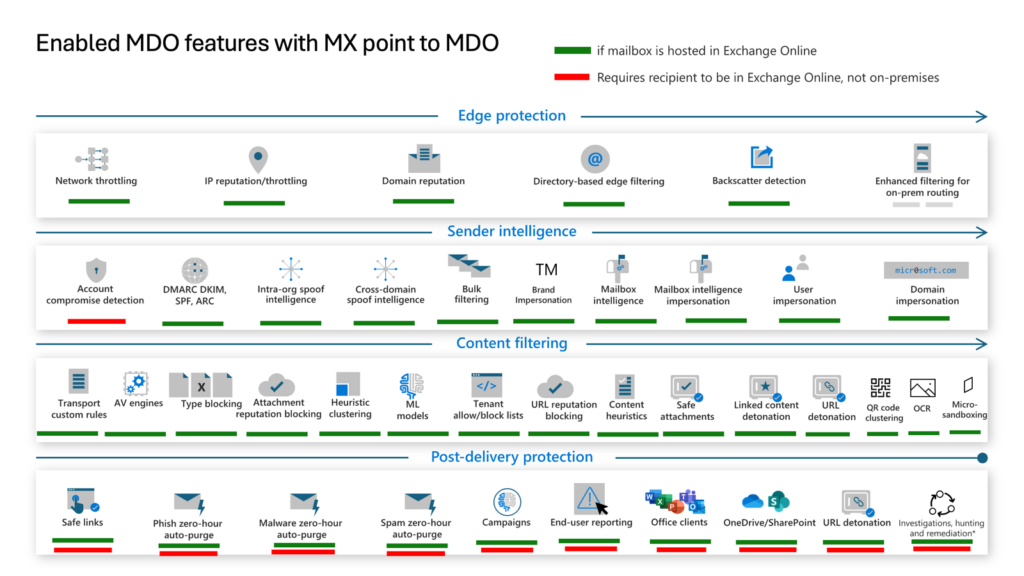
Figure 1: Enabled MDO features with MX point to EOP/MDO
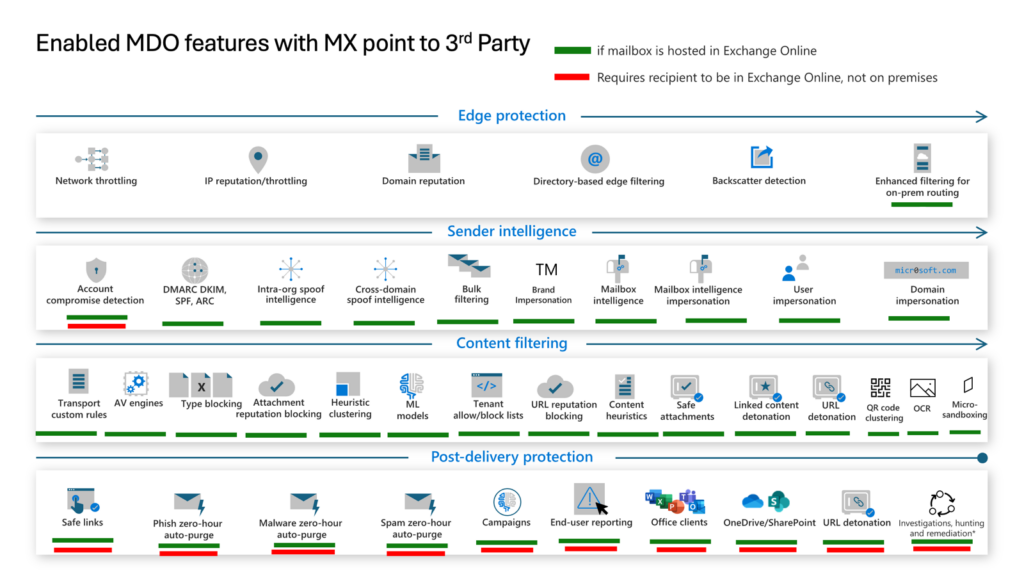
Figure 2: Enabled MDO features with MX points to 3rd Party

Figure 3: Enabled MDO features with MX points to MDO but integrated Cloud Email Security Provider behind
Why MX Record Configuration Matters
Your MX record configuration directly determines which Microsoft Defender for Office 365 features are available to you. This is a critical decision that affects your email security posture and the effectiveness of your threat protection.
Three Common MX Routing Scenarios
Scenario 1: MX Points Directly to EOP (Recommended)
When your MX records point directly to Exchange Online Protection, you get access to the full feature set of Microsoft Defender for Office 365. This includes Safe Links, Safe Attachments, anti-phishing policies, and the complete threat intelligence stack. Microsoft recommends this configuration for optimal protection.
Scenario 2: Third-Party Filter in Front of MDO
If you route mail through a third-party filtering solution before it reaches EOP, several MDO features become unavailable or degraded. Zero-hour Auto Purge (ZAP) and some correlation capabilities are affected. You need to evaluate which features you are giving up before making this choice.
Scenario 3: Third-Party Filter Behind MDO
Placing a third-party solution after MDO is less common but possible. In this setup, MDO handles initial filtering. You must ensure the downstream solution does not break SPF, DKIM or DMARC alignment.
Key Takeaways
- Always prefer MX pointing directly to EOP for full MDO feature access.
- Audit which features are unavailable before deploying a third-party filter.
- Use Authenticated Received Chain (ARC) to preserve email authentication through third-party systems.
- Combine MDO with a defense-in-depth strategy for layered protection.
Related Articles
- Exchange Online Security Best Practices – 10 Tips From The Field
- Exchange Hybrid Security Best Practices – 7 Tips From The Field
- Mastering Microsoft Defender for Servers: P1 vs P2